PRESS
Press the programming button.
nRFClaw turns an nRF52 microcontroller into an AI-programmable autonomous edge device. Describe a behavior in natural language, send it over Bluetooth, disconnect — and let the device keep running from a battery.
 nRFClawAI PROGRAMMABLE / BATTERY OPERATED
Program wirelessly. Deploy wirelessly. Operate autonomously.
Once the behavior is stored locally, the phone, computer and AI service can go away. The device wakes only when a sensor, timer or event requires it.
PROGRAMMING
Press the programming button.
Use a phone or computer over Bluetooth.
“Read temperature every 30 seconds and send it over LoRa.”Store the behavior locally.
Bluetooth programming is no longer required.
Leave it operating from battery.
ONE DEVICE. MANY BEHAVIORS.
“Enable tracking if motion is detected.”
Hide the device on a bike and let it stay in an ultra-low-power state until movement matters. No vehicle power connection is required.
“Monitor the HVAC and if vibration becomes different, send a message through Home Assistant.”
Sense locally, decide locally, transmit an event only when needed. Avoid continuously streaming raw vibration data.
“Read the temperature every 30 seconds and send it over LoRa.”
Periodic sensor acquisition and long-range transmission from a battery-powered node, with no data cable and no local Wi-Fi requirement.
“Activate motion sensing and if my door opens start broadcasting a beacon named ‘OPEN1’.”
The radio can remain dormant until the event occurs, then start advertising exactly the behavior you described.
BATTERY FIRST
Motion-triggered tracking profile.
Advertising / beacon profile.
Periodic LoRa telemetry profile.
These are representative measured/target low-power profiles for the reference setup. Actual average consumption and battery life depend on sensors, intervals, radio parameters, battery chemistry, temperature and application behavior.
HOME ASSISTANT
Home Assistant can turn an nRFClaw event into a Telegram notification and use the sensor entities it already receives to answer follow-up questions.
No Telegram stack on the device. nRFClaw detects, decides and sends the event. Home Assistant handles Internet access, bot credentials and messaging, keeping the battery-powered device simple and low-power.
For an ultra-low-power deployment, Home Assistant can answer from the latest sensor value already received from nRFClaw. A bidirectional gateway can also support on-demand commands when the radio architecture is configured for them.
nRFCLAW STUDIO
The Studio is the human interface to the device: describe what you want, let the semantic compiler translate the intent, then provision the resulting program over Bluetooth.
OPEN STUDIO ↗STUDIOOPEN SOURCE
nRFClaw is an open-source platform. Inspect it, modify it, port it and integrate it into your own product.
Explore the firmware, bootloader, VM, CLI, documentation and examples in the official public repository maintained by NearMeter.
VIEW ON GITHUB ↗DEVICE CAPABILITIES
nRFClaw exposes hardware, sensing, communication and persistent-state primitives to the autonomous runtime. The AI can combine these building blocks into behaviors instead of requiring a new firmware image for every application.
Digital and external device I/O.
Battery voltage and power-aware behavior.
Read and react to temperature locally.
Motion and acceleration sensing.
Long-range, low-power telemetry.
Application BLE services and interaction.
Time-based and scheduled behaviors.
Magnetic events, doors, meters and rotation.
Persistent state for autonomous logic.
Connect sensors and external equipment.
OpenHaystack-compatible tracking workflows.
Detect vibration and behavior changes.
HARDWARE FREEDOM
nRFClaw is not tied to a proprietary board. NinaSense is a low-power hardware platform well suited to the project, but another nRF52 design can be adapted to run nRFClaw.
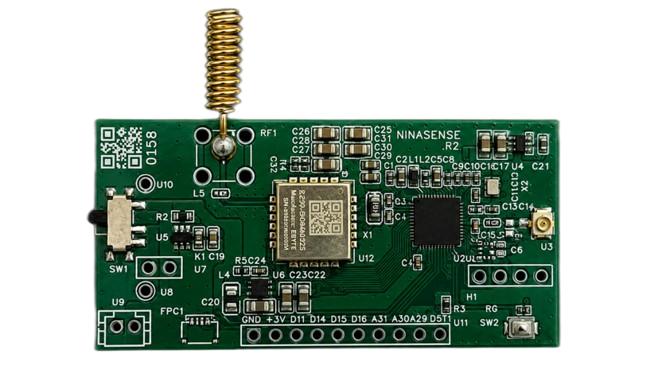
A low-power platform with nRF52832, LoRa, motion/vibration, temperature, Hall/Reed and GPIO options. It is ideal for nRFClaw — but not required.
nRFClaw: open-source project
NinaSense: commercial hardware
nRFCLAW KEYGEN
Use the companion Keygen for tracking provisioning workflows. Key material is derived in the browser — a small specialized tool in the nRFClaw ecosystem.
THE ECOSYSTEM
WHAT WILL YOU TEACH IT TO DO?